What is the Unified Registration Statement?
The Unified Registration Statement (URS) represents an effort to consolidate the information and data requirements of all states that require registration of nonprofit organizations performing charitable solicitations within their jurisdictions. The effort is organized by the National Association of State Charities Officials and the National Association of Attorneys General, and is one part of the Standardized Reporting Project, whose aim is to standardize, simplify, and economize compliance under the states' solicitation laws.
How Do I Use the URS?
The URS is an alternative to filing all of the respective registration forms produced by each of the cooperating states. In those states, a registering nonprofit may use either the state form or the URS. Thus, the URS proves most useful to nonprofits soliciting regionally or nationally and, therefore, subject to the registration laws of multiple states. But the URS may be used by any nonprofit that is registering in a state accepting it.
Conceptually, the process is simple. You fill out the URS by following its accompanying instructions; photocopy the completed URS (with state-specific items, including signature lines, left blank); fill in any state-specific items; execute (i.e., sign with or without notary) according to each state's requirements; collect and attach the specified governance (for initial filings) and other documents; write a check for the prescribed registration fee (if any); and mail the package, covered by the URS, to the respective state's administering agency (See Appendix).
What is the Most Recent Version of the URS?
The most recent version of the URS is v. 4.02, which was released in March 2014. Version 4.02 supports 37 jurisdictions (36 states and the District of Columbia), and requires (and includes) supplemental forms for 13 jurisdictions. V 4.02 includes updates for statute changes in certain states and updated contact information. A more detailed history of changes is available.
What's In the URS and How Can I Get It?
The URS is available in two formats:
- HMTL (Web page) version for browsing online. You may browse this version online, but do not print those web pages for actual use.
- Adobe PDF for printing and submission to regulatory authorities. Only the PDF version is suitable for printing and registration purposes. You can view and print the PDF format if you have installed the free Adobe Acrobat Reader (version 7.0 or later). To obtain a free copy of Adobe Acrobat Reader, click on this link.
![[get Acrobat Reader here]](getacro.gif)
- Please note: You may download copies of the Unified Registration Statement Kit ("Kit") for your own use, but not for the purpose of reproducing or posting the text, images, and other material anywhere on the Internet. The Multi-State Filer Project maintains all copyright and other notices contained in the Kit. All rights are exclusively reserved to Multi-State Filer Project.
© 2014 MULTI-STATE FILER PROJECT
FOR PRINTING THE URS: Open the PDF version of the URS by using this link.
FOR BROWSING ONLY: Unified Registration Statement Kit in HTML Format
Note: Links to an HTML version of the URS are provided below for your online viewing convenience, but this version shouldn't be printed for completion and submission. Please use the PDF version for printing.
Which States Require Registration of Charitable Soliciting Organizations and Accept the URS?
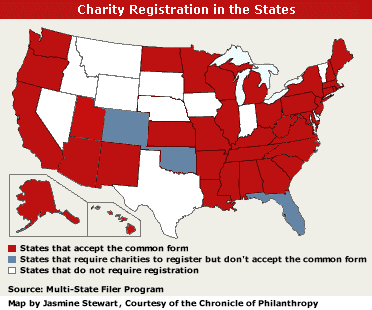
Which States Require Registration of Charitable Soliciting Organizations and Do Not Accept the URS?
How Do I Print the URS?
Only the printed PDF version of the URS (rather than the HTML version) may be used for registration purposes. To print the URS, follow the appropriate instructions below.
To Print Using Acrobat Reader Without a Web Browser
If you wish, you may download the URS to save a copy on your computer, and then print from that copy at any time.
To download the URS:
- Using a Windows or Macintosh system when you already have an Adobe Acrobat Reader installed, click here. (If you don't have the Reader installed, a free copy can be obtained from Adobe; instructions here.)
To print the downloaded URS:
- Find the folder with the saved URS. Double-click the mouse on the URS file.
- The Adobe Acrobat Reader software should start, and load the URS. If this does not happen, you may not have Acrobat Reader installed. You can obtain this software for free from Adobe's Web site.
- In Adobe Acrobat, select from the main menu "File" then within the drop-down menu "Print" and make sure that "Shrink to Fit" is NOT selected in the Print Dialog box that appears (see Figure 1 below).
- Choose a printer and set its properties as usual for your computer, then select the "Print" or "OK" button in the Print Dialog to begin printing.
![[a picture of the Adobe Acrobat print dialog box]](printdia.gif) |
Figure 1. Adobe Acrobat Reader's Print Dialog box
To Print From Within a Web Browser
- To print the URS from your Web browsers, you must have installed the Acrobat Reader plug-in for Web browsers, which is part of the free Adobe Acrobat Reader package. If you don't have this software installed, you can get it from the Adobe Web site.
- Open the PDF version of the URS by using this link. If the URS is correctly displayed within the Web browser, then continue to Step 2. If you know you have installed the Acrobat Reader but the URS isn't displayed within your Web browser, then follow the instructions above instead to download and "Print Using Acrobat Reader Without a Web Browser."
- Select Acrobat Reader's printing system to print the displayed URS. DO NOT use the Web browser's "File | Print" command on the main menu bar. DO select the Acrobat Reader's printer icon (see Figure 2 below) that is at the far left of the Acrobat Reader menu bar, which is displayed just above the open document.
- In the Print Dialog box that appears, make sure that "Shrink to Fit" is NOT selected (see Figure 1 above). Choose a printer and set its properties as usual for your computer, then select the "Print" or "OK" button in the Print Dialog to begin printing.
![[a picture of the Web browser's and embedded Acrobat Reader's printing methods]](printico.gif) |
Figure 2. Choosing the correct print method from within a Web browser
Who Can I Contact With Questions?
If you have questions about the Unified Registration Statement or the URS Kit, contact:
Multi-State Filer Project
1612 K Street #510
Washington, DC 20006-2802
The Unified Registration Statement Web site is hosted by BigSkyWeb.com.
This site was last updated March 2014.
© 2014 MULTI-STATE FILER PROJECT
|